

In this post, I am going to demonstrate how to receive GPS data and print it in the console using RTOS.
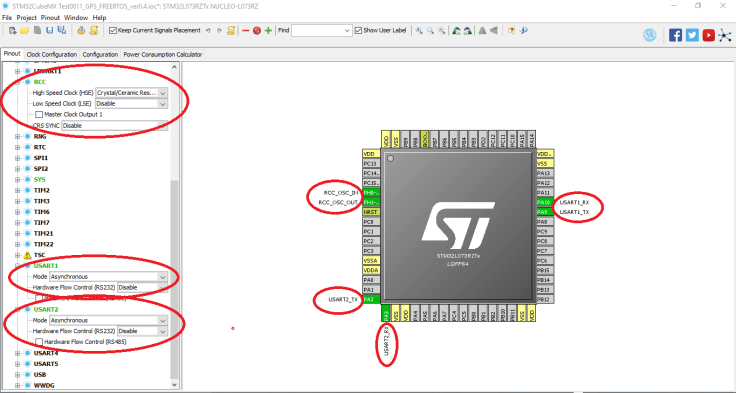
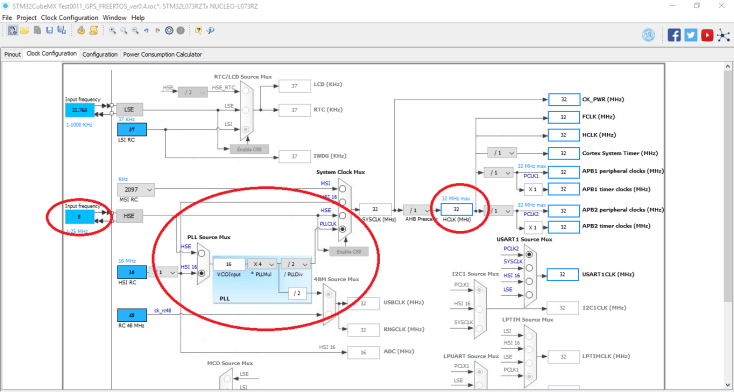
STM32CubeMX, when starting the project, we need to make the FreeRTOS, RCC and UART configurations as shown in figure -1, and the clock configuration is default or the input frequency is 8 and HCLK 32 (MHz). Please make configurations as shown below:
- Pinout Setting.
2. Clock Configurations.
3. UART Configuration.


4. NVIC and FREERTOS Configurations.


5. USART init functions.
Thanks to CubeMX it can generate the initialization source of the UART function, as we did the configuration above.
Make sure you have made USART_1 BaundRate = 9600. Since the data rate of the GPS module is 9600, otherwise we will not be able to get the correct data.


6. Supported message List.
The following NIMEA messages are supported:
- – Global Positioning System Fix Data
- – Geographic Position – Latitude/Longitude
- – GNSS DOP and Active Satellites
- – GNS Satellites in View
- – Recommended Minimum Specific GNSS Data
- – Course Over Ground and Ground Speed
- – UTC, Day, Month, Year and Local Time Zone
Supported messages are flow stream. In this case, we are going to choose one of them, for example, GGA.
So in our source code if (message == GGA) it goes to detect message size 11.
Structure:
$GPGGA,hhmmss.sss,ddmm.mmmm,a,dddmm.mmmm,a,x,xx,x.x,x.x,M,,,,xxxx*hh<CR<LF
1, 2, 3, 4, 5, 6, 7, 8, 9, 10, 11
Example:
$GPGGA,111636.932,2447.0949,N,12100.5223,E,1,11,0.8,118.2,M,,,,0000*02<CR><LF>
In order to cut each details we use here split method.
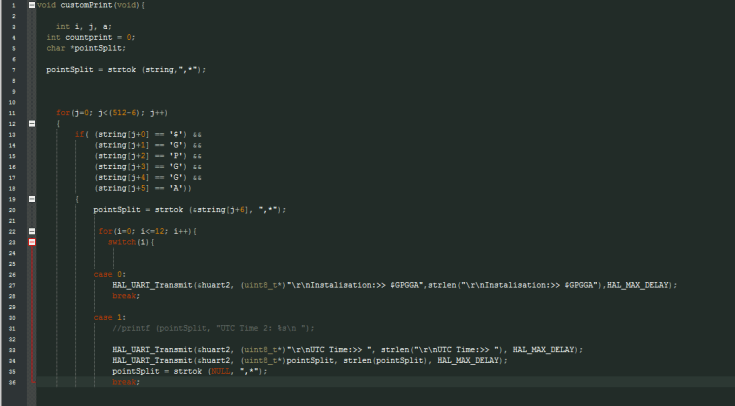
One more important part in this source code, task synchronization method in RTOS. Purpose of this method, while “GPSReceive()” gathering data don’t permit to print costumed data “customPrint()”. That means that it will wait until (index_string = 512) make state false.


The full source code of this post, you can find in my GitHub.
References:
Thank you!
 Developer Evolution
Leave a comment